Showing posts with label crx. Show all posts

Tuesday, September 9, 2008

Sling OSGi Track pt 7: configuring services at runtime

This is the continuation of

In this part, I will explain how to use the OSGi configuration management to configure services at runtime.

Suppose I want a service that can do more than just say "hello". I want the phrase the service returns from the sayHello() method to be configurable at runtime. This is easily done through OSGi configuration management.

Aims:

  • Show how to introduce a configurable property into an OSGi bundle
  • Show how to change the configuration through the OSGi configuration manager

Ingredients:

Files:

Outline:

  • Project Structure
  • Changes to the implementation
  • The pom
  • The results
  • Testing

Execution

Project Structure

From here on, I am no longer bundling the sample client script, as we've done our own client servlet in part 6 of this track. So we're back to just the pom, the interface and the implementation.

.
|-- pom.xml
`-- src
    `-- main
        `-- java
            `-- mh
                `-- osgitest
                    |-- SampleService.java
                    `-- SampleServiceImpl.java
Changes to the implementation

The only semantic change is in lines 18 and 21: a property helloPhrase is introduced and the value that is returned from the "sayHello()" method is read from that property.

Lines 11-14 introduce a constant, PROP_HELLO_PHRASE. The value of that constant will be used as a key to store the actual value. Line 12 points to the DEFAULT_HELLO_PHRASE constant for the default value. The following would have been equivalent, but it's better practice to use constants, so that the default value can be reffered to from Java code.

	/**
	 * @scr.property value="hello"
	 */
	public static final String PROP_HELLO_PHRASE = "mh.osgitest.helloPhrase";

the activate() method is called when the component is activated. At that point, we can obtain configuration values from the properties that are part of the ComponentContext that is passed as the method's argument.

package mh.osgitest;

import org.osgi.service.component.ComponentContext;

/**
 * @scr.component immediate="true"
 * @scr.service interface="SampleService"
 */
public class SampleServiceImpl implements SampleService {

	/**
	 * @scr.property valueRef="DEFAULT_HELLO_PHRASE"
	 */
	public static final String PROP_HELLO_PHRASE = "mh.osgitest.helloPhrase";

	public static final String DEFAULT_HELLO_PHRASE = "hello";

	private String helloPhrase;

	public String sayHello() {
		return helloPhrase;
	}

	protected void activate(ComponentContext context) {
		Object helloPhrase = context.getProperties().get(PROP_HELLO_PHRASE);
		if (helloPhrase != null)
			this.helloPhrase = helloPhrase.toString();
	}
}
The pom

The pom is very straight forward. Nothing special here.

<project xmlns="http://maven.apache.org/POM/4.0.0" xmlns:xsi="http://www.w3.org/2001/XMLSchema-instance"
	xsi:schemaLocation="http://maven.apache.org/POM/4.0.0 http://maven.apache.org/maven-v4_0_0.xsd">
	<modelVersion>4.0.0</modelVersion>
	<groupId>mh.studies</groupId>
	<artifactId>mh.studies.sling.osgitest</artifactId>
	<name>OSGI Test Bundle</name>
	<version>0.0.7</version>
	<packaging>bundle</packaging>
	<description />
	<build>
		<plugins>
			<plugin>
				<groupId>org.apache.maven.plugins</groupId>
				<artifactId>maven-compiler-plugin</artifactId>
				<configuration>
					<source>1.5</source>
					<target>1.5</target>
				</configuration>
			</plugin>
			<plugin>
				<groupId>org.apache.sling</groupId>
				<artifactId>maven-sling-plugin</artifactId>
				<version>2.0.2-incubator</version>
				<executions>
					<execution>
						<id>install-bundle</id>
						<goals>
							<goal>install</goal>
						</goals>
						<configuration>
							<slingUrl> http://localhost:7402/system/console/install</slingUrl>
							<user>admin</user>
							<password>admin</password>
						</configuration>
					</execution>
				</executions>
			</plugin>
			<plugin>
			    <groupId>org.apache.felix</groupId>
			    <artifactId>maven-scr-plugin</artifactId>
			    <version>1.0.7</version>
			    <executions>
			        <execution>
			            <id>generate-scr-scrdescriptor</id>
			            <goals>
			                <goal>scr</goal>
			            </goals>
			        </execution>
			    </executions>
			</plugin>			
			<plugin>
				<groupId>org.apache.felix</groupId>
				<artifactId>maven-bundle-plugin</artifactId>
				<version>1.4.3</version>
				<extensions>true</extensions>
				<configuration>
					<instructions>
						<Export-Package>mh.osgitest</Export-Package>
						<Import-Package>
                            org.osgi.framework;version="1.3.0",
                            org.osgi.service.component
                        </Import-Package>
						<Bundle-SymbolicName>${pom.artifactId}</Bundle-SymbolicName>
						<Bundle-Name>${pom.name}</Bundle-Name>
						<Bundle-Vendor>Moritz Havelock</Bundle-Vendor>
					</instructions>
				</configuration>
			</plugin>
		</plugins>
	</build>
	<repositories>
		<repository>
			<id>apache.incubating</id>
			<name>Apache Incubating Repository</name>
			<url>http://people.apache.org/repo/m2-incubating-repository</url>
		</repository>
	</repositories>
	<pluginRepositories>
		<pluginRepository>
			<id>apache.incubating.plugins</id>
			<name>Apache Incubating Plugin Repository</name>
			<url>http://people.apache.org/repo/m2-incubating-repository
			</url>
		</pluginRepository>
	</pluginRepositories>
	<dependencies>
		<dependency>
			<groupId>org.apache.felix</groupId>
			<artifactId>org.osgi.core</artifactId>
			<version>1.0.1</version>
		</dependency>
            <dependency>
            <groupId>org.apache.felix</groupId>
            <artifactId>org.osgi.compendium</artifactId>
            <version>1.0.1</version>
        </dependency>
	</dependencies>
</project>
The results

After deploying the Bundle, I do a quick test and call http://localhost:7402/system/osgitest/info. That requires that the Servlet from the last part is still installed. If you have not followed along, grab it from here: http://in-the-sling.blogspot.com/2008/09/sling-osgi-track-pt-6-sling-servlets-i.html.

As expected, I get the result "hello".

Now, I hit the OSGi configuration management console at http://localhost:7402/system/console/configMgr and select my bundle from the drop down:

snap002 2008-09-09

Don't be confused by the naming of the entries. They can easily be replaced, but I will keep focused on the important stuff for a while and leave these out of consideration.

I get the following screen, which allows me to configure the component's properties. In our case, that is the "helloPhrase" property, which I can change by entering a new value into the text box and hitting "save".

snap003 2008-09-09


Testing

The final test is to again hit http://localhost:7402/system/osgitest/info, which should now return the new value of the "helloPhrase" property.

Technorati Tags: ,,

Wednesday, September 3, 2008

Sling OSGI Track pt 6: Sling Servlets I

This is the continuation of

In this part, I will show how to create your own Sling Servlet and deploy it as an OSGi Bundle.

As you may have seen from the sling documentation, there is a pretty straightforward way to create scripts on the search paths (/apps, /libs) that will be executed depending on properties of the requested resource (most notably sling:resourceType.

You can do the same using servlets, if you prefer.
Using servlets, you can also do a lot more than with scripts, and we'll have a first look at what can be done right now.
As a first easy example, I will show how to create a servlet that uses the service created in the previous parts and makes the output available at /system/osgitest/info .

Aims:

  • Show how to create a Sling Servlet and register it to respond to a preset path.

Ingredients:

Files:

Outline:

  • Project structure
  • The servlet implementation
  • The pom: nothing special
  • Maven dependencies: oops
  • Build, Deploy, Test

Execution:

Project structure

The project structure is simpler than anything we had so far. We actually need no more than the servlet implementation and the pom. Let's have a look:

.
|-- pom.xml
`-- src
    `-- main
        `-- java
            `-- mh
                `-- osgitest
                    `-- client
                        `-- OsgiTestClientServlet.java
The servlet implementation

Let's have a look at the servlet implementation:

  • The servlet extends SlingSafeMethodsServlet (l. 25).
    This is a sling-provided class that can be extended to implement servlets that do not have side-effects, i.e. do not modify data. See http://svn.apache.org/viewvc/incubator/sling/trunk/api/src/main/java/org/apache/sling/api/servlets/SlingSafeMethodsServlet.java?view=markup for the details.
  • The servlet overrides the doGet method (l. 31ff).
    In this method, it checks whether it's "service" variable is set (which is of the type 'SampleService' from our previous parts of this track), and if so calls sayHello() on the object to write the result to the output stream.
  • OK, so how can the service variable ever be anything but null? That happens through the src.reference directive in line 27. This will create an OSGi service descriptor, and the OSGi container will inject the reference to a SampleService instance, if available.
  • In line 22, the sling.servlet.paths property is set to /system/osgitest/info. This creates the mapping to the URL /system/osgitest/info, which the servlet will respond to.
    There are many other options of creating mappings depending on the resource that is being accessed, depending on method, etc. Part of this is explained in http://incubator.apache.org/sling/site/servlet-resolution.html, but that description is outdated. I'll look into the other options in further posts.
package mh.osgitest.client;

import java.io.IOException;

import javax.servlet.ServletException;
import javax.servlet.http.HttpServletResponse;

import mh.osgitest.SampleService;

import org.apache.sling.api.SlingHttpServletRequest;
import org.apache.sling.api.SlingHttpServletResponse;
import org.apache.sling.api.servlets.SlingSafeMethodsServlet;

/**
 * A Servlet that uses the service provided in the mh.osgitest to retrieve the
 * phrase "hello".
 * 
 * @scr.component immediate="true" metatype="no"
 * @scr.service interface="javax.servlet.Servlet"
 * @scr.property name="service.description" value="Sample OSGi Client Servlet"
 * @scr.property name="service.vendor" value="Moritz Havelock"
 * @scr.property name="sling.servlet.paths" value="/system/osgitest/info"
 */
@SuppressWarnings("serial")
public class OsgiTestClientServlet extends SlingSafeMethodsServlet {
	
	/** @scr.reference */
	private final SampleService service = null;

	@Override
	protected void doGet(SlingHttpServletRequest request,
			SlingHttpServletResponse response) throws ServletException,
			IOException {
		if (service == null) {
			response.sendError(HttpServletResponse.SC_SERVICE_UNAVAILABLE,
					"no reference to service available");
		} else {
			response.setContentType("text/plain");
			response.getOutputStream().print(service.sayHello());
		}
	}
}
The pom: nothing special

The pom looks quite familiar. What's different this time?
On lines 93-97, we have a dependency on the org.apache.sling.api artifact. That is because we are using sling specific types in the servlet implementation. I have here used the version 2.0.0.incubator-SNAPSHOT, which is what comes with CRX Cup edition.
On lines 98-102, we depend on the mh.studies.sling.osgitest artifact. This should be in your m2 repository from the previous tracks.

<project xmlns="http://maven.apache.org/POM/4.0.0" xmlns:xsi="http://www.w3.org/2001/XMLSchema-instance"
   xsi:schemaLocation="http://maven.apache.org/POM/4.0.0 http://maven.apache.org/maven-v4_0_0.xsd">
   <modelVersion>4.0.0</modelVersion>
   <groupId>mh.studies</groupId>
   <artifactId>mh.studies.sling.osgitest.client</artifactId>
   <packaging>bundle</packaging>
   <name>A Servlet Client for the OSGi Test Bundle</name>
   <version>0.0.1</version>
   <description />
   <build>
      <plugins>
         <plugin>
            <groupId>org.apache.maven.plugins</groupId>
            <artifactId>maven-compiler-plugin</artifactId>
            <configuration>
               <source>1.5</source>
               <target>1.5</target>
            </configuration>
         </plugin>
         <plugin>
            <groupId>org.apache.sling</groupId>
            <artifactId>maven-sling-plugin</artifactId>
            <version>2.0.2-incubator</version>
            <executions>
               <execution>
                  <id>install-bundle</id>
                  <goals>
                     <goal>install</goal>
                  </goals>
                  <configuration>
                     <slingUrl>http://localhost:7402/system/console/install</slingUrl>
                     <user>admin</user>
                     <password>admin</password>
                  </configuration>
               </execution>
            </executions>
         </plugin>
         <plugin>
            <groupId>org.apache.felix</groupId>
            <artifactId>maven-scr-plugin</artifactId>
            <version>1.0.7</version>
            <executions>
               <execution>
                  <id>generate-scr-scrdescriptor</id>
                  <goals>
                     <goal>scr</goal>
                  </goals>
               </execution>
            </executions>
         </plugin>
         <plugin>
            <groupId>org.apache.felix</groupId>
            <artifactId>maven-bundle-plugin</artifactId>
            <version>1.4.3</version>
            <extensions>true</extensions>
            <configuration>
               <instructions>
                  <Export-Package></Export-Package>
                  <Private-Package>mh.osgitest.client</Private-Package>
                  <Bundle-SymbolicName>${pom.artifactId}</Bundle-SymbolicName>
                  <Bundle-Name>${pom.name}</Bundle-Name>
               </instructions>
            </configuration>
         </plugin>
      </plugins>
   </build>
   <repositories>
      <repository>
         <id>apache.incubating</id>
         <name>Apache Incubating Repository</name>
         <url>http://people.apache.org/repo/m2-incubating-repository</url>
      </repository>
   </repositories>
   <pluginRepositories>
      <pluginRepository>
         <id>apache.incubating.plugins</id>
         <name>Apache Incubating Plugin Repository</name>
         <url>http://people.apache.org/repo/m2-incubating-repository 
         </url>
      </pluginRepository>
   </pluginRepositories>
   <dependencies>
      <dependency>
         <groupId>javax.servlet</groupId>
         <artifactId>servlet-api</artifactId>
         <version>2.4</version>
      </dependency>
      <dependency>
         <groupId>org.apache.felix</groupId>
         <artifactId>org.osgi.core</artifactId>
         <version>1.0.0</version>
      </dependency>
      <dependency>
         <groupId>org.apache.sling</groupId>
         <artifactId>org.apache.sling.api</artifactId>
         <version>2.0.0.incubator-SNAPSHOT</version>
      </dependency>
      <dependency>
         <groupId>mh.studies</groupId>
         <artifactId>mh.studies.sling.osgitest</artifactId>
         <version>0.0.5</version>
      </dependency>
   </dependencies>
</project>
Maven dependencies: oops

Everything looks easy so far, but there's one catch: no public m2 repository can satisfy the dependency on org.apache.sling.api-2.0.0.incubator-SNAPSHOT, so that when you now run mvn package, you will end up with the following:

D:\projekte\workspace-sling\mh.studies.sling.osgitest.client>mvn package
[INFO] Scanning for projects...
[INFO] ------------------------------------------------------------------------
[INFO] Building A Servlet Client for the OSGi Test Bundle
[INFO]    task-segment: [package]
[INFO] ------------------------------------------------------------------------
[INFO] [resources:resources]
[INFO] Using default encoding to copy filtered resources.
[INFO] snapshot org.apache.sling:org.apache.sling.api:2.0.0.incubator-SNAPSHOT: checking for updates from apache.incubating
Downloading: http://people.apache.org/repo/m2-incubating-repository/org/apache/sling/org.apache.sling.api/2.0.0.incubator-SNAPSHOT/org.apache.sling.api-2.0.0.incubator-SNAPSHOT.pom

Downloading: http://people.apache.org/repo/m2-incubating-repository/org/apache/sling/org.apache.sling.api/2.0.0.incubator-SNAPSHOT/org.apache.sling.api-2.0.0.incubator-SNAPSHOT.jar

[INFO] ------------------------------------------------------------------------
[ERROR] BUILD ERROR
[INFO] ------------------------------------------------------------------------
[INFO] Failed to resolve artifact.

Missing:
----------
1) org.apache.sling:org.apache.sling.api:jar:2.0.0.incubator-SNAPSHOT

  Try downloading the file manually from the project website.

  Then, install it using the command:
      mvn install:install-file -DgroupId=org.apache.sling -DartifactId=org.apache.sling.api -Dversion=2.0.0.incubator-SNAPSHOT -Dpackaging=jar -Dfile=/path/to/file

  Alternatively, if you host your own repository you can deploy the file there:
      mvn deploy:deploy-file -DgroupId=org.apache.sling -DartifactId=org.apache.sling.api -Dversion=2.0.0.incubator-SNAPSHOT -Dpackaging=jar -Dfile=/path/to/file -Durl=[url] -DrepositoryId=[id]

  Path to dependency:
        1) mh.studies:mh.studies.sling.osgitest.client:bundle:0.0.1
        2) org.apache.sling:org.apache.sling.api:jar:2.0.0.incubator-SNAPSHOT

----------
1 required artifact is missing.

for artifact:
  mh.studies:mh.studies.sling.osgitest.client:bundle:0.0.1

from the specified remote repositories:
  central (http://repo1.maven.org/maven2),
  apache.incubating (http://people.apache.org/repo/m2-incubating-repository)


[INFO] ------------------------------------------------------------------------
[INFO] For more information, run Maven with the -e switch
[INFO] ------------------------------------------------------------------------
[INFO] Total time: 3 seconds
[INFO] Finished at: Wed Sep 03 16:56:39 CEST 2008
[INFO] Final Memory: 5M/9M
[INFO] ------------------------------------------------------------------------

Don't let it bring you down -- the problem is easily solved, even if it takes a few steps. Note the lines 21 - 26 above. They already show that there is a solution at hand. Now all we need is the jar file. Don't look on the sling website, it's already on your machine. Go to the place you started CRX Quickstart from, and you'll find it here: ./crx-quickstart/server/runtime/0/_/WEB-INF/resources/bundles/org.apache.sling.api-2.0.0-incubator-SNAPSHOT.jar. Now, you only need to execute the following:

mvn install:install-file -DgroupId=org.apache.sling -DartifactId=org.apache.sling.api -Dversion=2.0.0.incubator-SNAPSHOT -Dpackaging=jar \
  -Dfile=<crx quickstart dir>/crx-quickstart/server/runtime/0/_/WEB-INF/resources/bundles/org.apache.sling.api-2.0.0-incubator-SNAPSHOT.jar
Build, Deploy, Test

All that remains is mvn clean install, and go to http://localhost:7402/system/osgitest/info

Friday, August 29, 2008

Sling OSGi Track pt 3: replacing the Activator with DS

This is the continuation of

In this part, I will show how to declare the SampleService instead of registering it explicitly by an activator

Aims:

  • Show how to declare a service component

Ingredients:

Files:

Outline:

  • Add the scr plugin to the pom
  • Remove the activator
  • Add scr tags
  • Build, Install, Test

Execution:

Add the scr plugin to the pom

Add the following snippet to the build plugins:

  1:  <plugin>
  2:      <groupId>org.apache.felix</groupId>
  3:      <artifactId>maven-scr-plugin</artifactId>
  4:      <version>1.0.7</version>
  5:      <executions>
  6:          <execution>
  7:              <id>generate-scr-scrdescriptor</id>
  8:              <goals>
  9:                  <goal>scr</goal>
 10:              </goals>
 11:          </execution>
 12:      </executions>
 13:  </plugin> 
Remove the activator

As we no longer will use explicit activation, we remove the Activator from the sources and remove the following line from the pom:

<Bundle-Activator>mh.osgitest.Activator</Bundle-Activator>
Add scr tags

Now, we add the scr tags to the implementing class.

Line (4) declares the class as a component. This will provide a wrapped ManagedService Component in the OSGi container (I'll come to ManageServices later)

Line (5) declares the service we are offering. Actually, the interface attribute is superflous, as by default, all implemented Interfaces are used.

  1: package mh.osgitest;
  2:
  3: /**
  4:  * @scr.component
  5:  * @scr.service interface="SampleService"
  6:  */
  7: public class SampleServiceImpl implements SampleService {
  8:  public String sayHello() {
  9:   return "hello";
 10:  }
 11: }
Build, Install, Test

First, mvn clean package

To install the bundle, go to the system console at http://localhost:7402/system/console/list.

Then, call the URL http://localhost:7402/test .

For the detail of these two steps, have a look at the first post in this series: /2008/08/basic-osgi-service-for-sling.html

Thursday, August 28, 2008

Sling OSGi Track pt 2: using Felix' bundle plugin for manifest entries

This is the continuation of  Sling OSGi Track pt 1: hand-rolled service bundle.

In this part, I will remove the manually created MANIFEST.MF, and have it created by the Maven2 felix-bundle-plugin.

Aims:

  • define OSGi-specific manifest entries in pom.xml and let Maven create the manifest

Ingredients:

Files:

Outline:

  • enable and configure the plugin in pom.xml
  • change the packaging style in pom.xml
  • stop merging our own manifest into the created jar and remove manifest file

Execution:

enable and configure the plugin in pom.xml

The plugin configuration is done in lines 20-35.
(27): Export-Package creates and Export-Package manifest entry with the same content
(28): same for Import-Package
(29): the symbolic name is taken from the pom's articactId
(30): the bundle name is taken from the pom's project name
(32): Bundle-Activator -- the main class

change the packaging style in pom.xml

We need to change the packaging style to "bundle" (defaults to "jar") for the plugin to do its work.
This is done in line 8.

  1: <project xmlns="http://maven.apache.org/POM/4.0.0" xmlns:xsi="http://www.w3.org/2001/XMLSchema-instance"
  2: 	xsi:schemaLocation="http://maven.apache.org/POM/4.0.0 http://maven.apache.org/maven-v4_0_0.xsd">
  3: 	<modelVersion>4.0.0</modelVersion>
  4: 	<groupId>mh.studies</groupId>
  5: 	<artifactId>mh.studies.sling.osgitest</artifactId>
  6: 	<name>OSGI Test Bundle</name>
  7: 	<version>0.0.2</version>
  8: 	<packaging>bundle</packaging>
  9: 	<description />
 10: 	<build>
 11: 		<plugins>
 12: 			<plugin>
 13: 				<groupId>org.apache.maven.plugins</groupId>
 14: 				<artifactId>maven-compiler-plugin</artifactId>
 15: 				<configuration>
 16: 					<source>1.5</source>
 17: 					<target>1.5</target>
 18: 				</configuration>
 19: 			</plugin>
 20: 			<plugin>
 21: 				<groupId>org.apache.felix</groupId>
 22: 				<artifactId>maven-bundle-plugin</artifactId>
 23: 				<version>1.4.3</version>
 24: 				<extensions>true</extensions>
 25: 				<configuration>
 26: 					<instructions>
 27: 						<Export-Package>mh.osgitest</Export-Package>
 28: 						<Import-Package>org.osgi.framework;version="1.3.0"</Import-Package>
 29: 						<Bundle-SymbolicName>${pom.artifactId}</Bundle-SymbolicName>
 30: 						<Bundle-Name>${pom.name}</Bundle-Name>
 31: 						<Bundle-Vendor>Moritz Havelock</Bundle-Vendor>
 32: 						<Bundle-Activator>mh.osgitest.Activator</Bundle-Activator>
 33: 						<Built-By>Moritz Havelock</Built-By>
 34: 					</instructions>
 35: 				</configuration>
 36: 			</plugin>
 37: 		</plugins>
 38: 	</build>
 39: 	<dependencies>
 40: 		<dependency>
 41: 			<groupId>org.apache.felix</groupId>
 42: 			<artifactId>org.osgi.core</artifactId>
 43: 			<version>1.0.1</version>
 44: 		</dependency>
 45: 	</dependencies>
 46: </project>

stop merging our own manifest into the created jar and remove manifest file

We can now remove the file src/main/resources/META-INF/MANIFEST.MF, as this will be auto-generated.
Also, we can remove the following section from the pom.

			<plugin>
				<groupId>org.apache.maven.plugins</groupId>
				<artifactId>maven-jar-plugin</artifactId>
				<version>2.2</version>
				<configuration>
					<archive>
						<manifestFile>src/main/resources/META-INF/MANIFEST.MF</manifestFile>
					</archive>
				</configuration>
			</plugin>
 
Build

Do an "mvn clean package".

Now, open the created jar file ( target/mh.studies.sling.osgitest-0.0.2.jar ), and have a look at the created META-INF/MANIFEST.MF:
as you can see, all the lines we previously created manually are there, looking much the same.
There are slight differences in (7) -- the used packages are declared, and (3), (2), (11) and (15) are new.

  1: Manifest-Version: 1.0
  2: Built-By: Moritz Havelock
  3: Created-By: Apache Maven Bundle Plugin
  4: Bundle-Activator: mh.osgitest.Activator
  5: Import-Package: org.osgi.framework;version="1.3.0"
  6: Bnd-LastModified: 1219937878156
  7: Export-Package: mh.osgitest;uses:="org.osgi.framework"
  8: Bundle-Version: 0.0.2
  9: Bundle-Name: OSGI Test Bundle
 10: Bundle-ClassPath: .
 11: Build-Jdk: 1.5.0_16
 12: Bundle-ManifestVersion: 2
 13: Bundle-Vendor: Moritz Havelock
 14: Bundle-SymbolicName: mh.studies.sling.osgitest
 15: Tool: Bnd-0.0.255


Install / Test Client

To install the bundle, go to the system console at http://localhost:7402/system/console/list.

Then, call the URL http://localhost:7402/test .

For the detail of these two steps, have a look at the previous post: /2008/08/basic-osgi-service-for-sling.html

Sling OSGi Track pt 1: hand-rolled service bundle

Technorati Tags: ,,

This is the first in a series that tries to show how to create OSGi bundles for sling.

I'll create a very simple service that answers with "hello" when asked to say hello.
This is little functionality, but demonstrates how to get the tools ready for creating CRX bundles.

Aims:

  • create a service that returns the String "hello" when called with sayHello()
  • use maven for building

Ingredients:

  • CRX-quickstart

Files:

Outline:

  • Project structure
  • Define the service interface
  • Create an implementation of that interface
  • Create an Activator that registers the service
  • Create the Manifest
  • Create the Maven pom
  • Build
  • Install
  • Create a test client

Execution:

Project structure
.
|-- pom.xml
`-- src
    `-- main
        |-- java
        |   `-- mh
        |       `-- osgitest
        |           |-- Activator.java
        |           |-- SampleService.java
        |           `-- SampleServiceImpl.java
        `-- resources
            `-- META-INF
                `-- MANIFEST.MF
Define the service interface

The service interface is straightforward: it contains a single public method.

  1: package mh.osgitest;
  2: 
  3: public interface SampleService {
  4: 	public String sayHello();
  5: }
Create an implementation of that interface

This is just as easy and pojo:

  1: package mh.osgitest;
  2: 
  3: public class SampleServiceImpl implements SampleService {
  4: 	public String sayHello() {
  5: 		return "hello";
  6: 	}
  7: }
  8: 
Create an activator that registers the service

Every OSGi bundle must have an activator that implements the BundleActivator interface.
(simplification. declarative services do not need an activator).

The BundleActivator gives us start and stop methods that will be called when the bundles is started / stopped by the container.
In the start method, the service instance is created (11), and then registered. The registerService method of the BundleContext receives the class name under which the service is registered and by which it can be located (14), the service instance (15) and an empty configuration table.

  1: package mh.osgitest;
  2: 
  3: import java.util.Hashtable;
  4: import org.osgi.framework.BundleActivator;
  5: import org.osgi.framework.BundleContext;
  6: 
  7: public class Activator implements BundleActivator {
  8: 
  9: 	public void start(BundleContext context) throws Exception {
 10: 
 11: 		SampleService sample = new SampleServiceImpl();
 12: 
 13: 		context.registerService(
 14: 				SampleService.class.getName(), 
 15: 				sample,
 16: 				new Hashtable<Object, Object>());
 17: 
 18: 		System.err.println("SampleService Started");
 19: 	}
 20: 
 21: 	public void stop(BundleContext context) throws Exception {
 22: 		System.err.println("SampleService Stopped");
 23: 	}
 24: }
Create the Manifest

The manifest file needs some OSGi specific entries:

  1: Manifest-Version: 1.0
  2: Bundle-ManifestVersion: 2
  3: Bundle-Name: Simple OSGITest
  4: Bundle-SymbolicName: mh.osgitest
  5: Bundle-Version: 1.0.0
  6: Bundle-Activator: mh.osgitest.Activator
  7: Bundle-Vendor: Moritz Havelock
  8: Import-Package: org.osgi.framework;version="1.3.0"
  9: Export-Package: mh.osgitest;version=0.0.1
 10: Bundle-ClassPath: .


(3) Name of the Bundle. Choose freely
(4) The symbolic name by which the bundle is referred to.
(6) the activator is the name of the class that implements BundleActivator
(8) Import-Package declares the packages that this bundle expects to be provided by other packages.
(9) Export-Package declares the package that is exposed and available to other bundles.

Create the Maven pom

The only things needed (except for dependencies) are

  • configuring our own manifest file to be blended in when bundling the jar file and
  • setting source style to Java 5
  1: <project xmlns="http://maven.apache.org/POM/4.0.0" xmlns:xsi="http://www.w3.org/2001/XMLSchema-instance"
  2: 	xsi:schemaLocation="http://maven.apache.org/POM/4.0.0 http://maven.apache.org/maven-v4_0_0.xsd">
  3: 	<modelVersion>4.0.0</modelVersion>
  4: 	<groupId>mh.studies</groupId>
  5: 	<artifactId>mh.studies.sling.osgitest</artifactId>
  6: 	<name>OSGI Test Bundle</name>
  7: 	<version>0.0.1</version>
  8: 	<description />
  9: 	<build>
 10: 		<plugins>
 11: 			<plugin>
 12: 				<groupId>org.apache.maven.plugins</groupId>
 13: 				<artifactId>maven-jar-plugin</artifactId>
 14: 				<version>2.2</version>
 15: 				<configuration>
 16: 					<archive>
 17: 						<manifestFile>src/main/resources/META-INF/MANIFEST.MF</manifestFile>
 18: 					</archive>
 19: 				</configuration>
 20: 			</plugin>
 21: 			<plugin>
 22: 				<groupId>org.apache.maven.plugins</groupId>
 23: 				<artifactId>maven-compiler-plugin</artifactId>
 24: 				<configuration>
 25: 					<source>1.5</source>
 26: 					<target>1.5</target>
 27: 				</configuration>
 28: 			</plugin>
 29: 		</plugins>
 30: 	</build>
 31: 	<dependencies>
 32: 		<dependency>
 33: 			<groupId>org.apache.felix</groupId>
 34: 			<artifactId>org.osgi.core</artifactId>
 35: 			<version>1.0.1</version>
 36: 		</dependency>
 37: 	</dependencies>
 38: </project>
Build
mvn clean package
Install

To install the bundle, go to the system console at http://localhost:7402/system/console/list.
(note that the system console does not fully work in Internet Explorer)

Hit the "Browse" button and select the jar file from the target/ directory created by maven.

Check the "Start" box, level the level at 20 and hit "Install or Update".

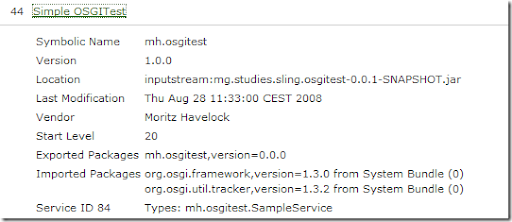
Then, hit "Refresh Package". You will then see an entry "Simple OSGITest" in the list of bundles. Click it to see an expanded view.
You will see the Bundle properties, plus the registered service of type mh.osgitest.SampleService.

SimpleOSGI-expanded

Create a test client

In the CRX browser, create a node /content/test of type nt:unstructured, and give it a property "sling:resourceType" with a value of "samples:osgitest".
Create the structure /apps/samples/osgitest, and there create the file GET.esp with the following contents.

In line 3, the service is obtained from the sling helper object.

  1: <%
  2: var service =
  3:   sling.getService(Packages.mh.osgitest.SampleService);
  4:   
  5: %><%= service.sayHello() %>

Now, you can use a browser or curl to call that URL with an impressing result ;-)

D:\projekte\workspace-sling\mh.studies.sling.osgitest>curl http://localhost:7402/test
hello